
Senior-Safe Computing: Protecting Yourself from Online Scams in 2025
The statistics are sobering: Canadians lost over $530 million to fraud in 2022, with seniors representing a disproportionate number of victims. Right here in Lethbridge, I see the aftermath of these scams weekly—seniors who trusted the wrong popup, clicked the wrong link, or believed the wrong story.
But here’s what scammers don’t want you to know: you can protect yourself. After helping hundreds of Lethbridge seniors recover from scams and prevent future attacks, I’ve learned that knowledge truly is your best defence.
Why Seniors Are Prime Targets
Scammers aren’t randomly choosing victims—they’re specifically targeting older adults for calculated reasons:
Trust and Politeness: Seniors often grew up in communities where helping strangers was normal. Scammers exploit this natural kindness, knowing many seniors will listen to their pitch rather than hang up immediately.
Financial Resources: Many seniors have retirement savings, own their homes, and have established credit—exactly what scammers want to access.
Technology Gap: While many seniors are becoming more tech-savvy, the learning curve creates vulnerability windows that scammers exploit with fake “tech support” calls and confusing popups.
Social Isolation: Especially post-pandemic, loneliness makes seniors more susceptible to romance scams and “friendship” schemes that develop over weeks or months.
Right here in Lethbridge, I’ve helped clients who lost thousands to fake CRA calls, bogus Microsoft alerts, and sophisticated romance scams. The good news? Every single one of these attacks was preventable with the right knowledge.
The Most Common Scams Targeting Seniors in 2025
 Fake Antivirus Popups
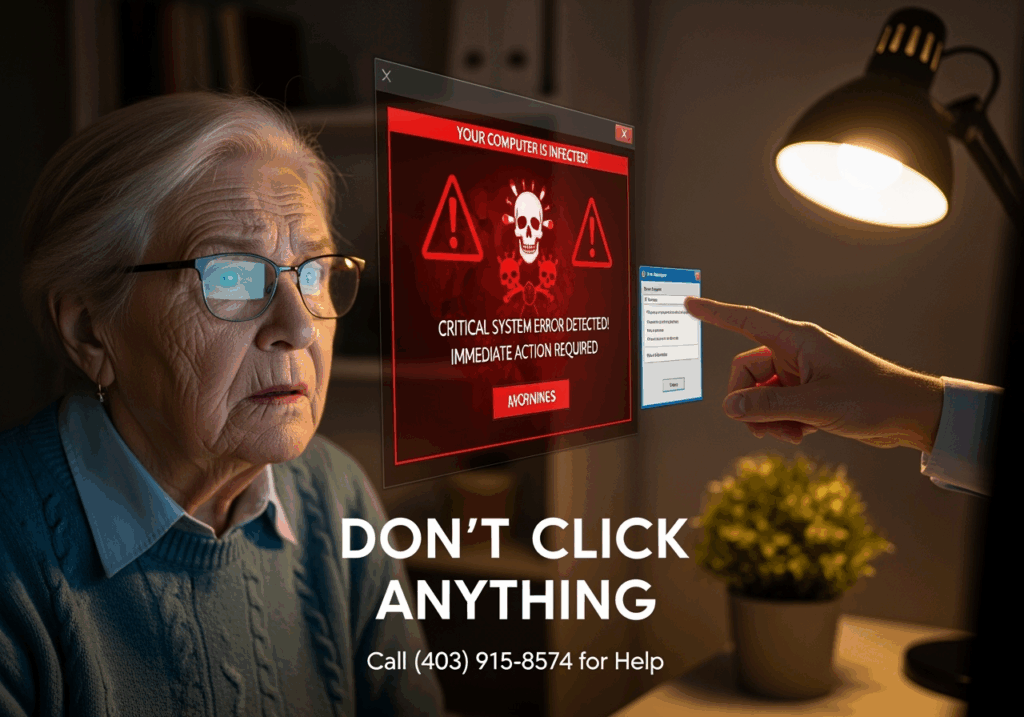 Fake Antivirus Popups
What they look like: A scary popup suddenly appears claiming “VIRUS DETECTED!” or “Your computer is infected with 5 viruses!” The popup looks official, often mimicking Microsoft or Apple designs, with urgent countdown timers and flashing red warnings.
Why they’re convincing: These popups are designed to trigger panic. They use official-looking logos, technical language, and create artificial urgency with phrases like “Act now or lose all your files!”
Immediate steps if you see one:
- Don’t click anything on the popup—not even the “X” to close it
- Press Ctrl+Alt+Delete and select Task Manager
- End your browser process completely
- Restart your browser and avoid returning to the website that triggered it
- If you’re unsure, call a trusted tech professional at (403) 915-8574
Email Phishing Scams
Banking/Credit Card Impersonation: Emails claiming your account is “suspended” or “compromised” with links to fake login pages that steal your credentials.
Government Agency Fakes: Messages from fake “CRA,” “Service Canada,” or “RCMP” demanding immediate payment or threatening arrest.
How to spot the red flags:
- Generic greetings like “Dear Customer” instead of your actual name
- Urgent language demanding “immediate action”
- Links that don’t match the sender’s actual website
- Poor grammar or spelling mistakes
- Requests for passwords, SINs, or banking details via email
Remember: Legitimate organizations never ask for sensitive information via email or threaten immediate consequences.
Social Media Investment Scams
Bitcoin and Cryptocurrency Lures: Fake investment opportunities promising guaranteed returns, often promoted through fake celebrity endorsements or “get rich quick” schemes.
Fake Friend Recommendations: Scammers create fake profiles, befriend seniors, then gradually introduce investment “opportunities” or request money for emergencies.
Romance Scam Variations: Online relationships that develop over months, with the scammer eventually requesting money for travel, medical emergencies, or business investments.
I recently helped a Lethbridge widow who lost $15,000 to someone she’d been “dating” online for six months. The scammer had photos, a compelling backstory, and called regularly—but every request for an in-person meeting had an excuse.
Warning Signs Every Senior Should Know
Regardless of the scam type, watch for these universal red flags:
Urgent Language and Time Pressure: “Act now!” “Limited time!” “Your account will be closed!” Legitimate businesses don’t operate with artificial urgency.
Requests for Remote Access: Never let strangers control your computer remotely. Legitimate tech support companies don’t cold-call offering to “fix” your computer.
Unusual Payment Methods: Requests for gift cards, wire transfers, cryptocurrency, or prepaid cards are almost always scams. Legitimate businesses accept normal payment methods.
Grammar and Spelling Mistakes: Professional organizations proofread their communications. Multiple errors often indicate scams.
Too Good to Be True: If an investment promises guaranteed high returns or a deal seems impossibly good, trust your instincts.
Your Digital Defence Strategy
Think of cybersecurity like home security—you need multiple layers of protection:
Layer 1: Proper Antivirus Protection
Not all antivirus software is created equal. Consumer-grade solutions from big box stores often miss sophisticated threats. Professional-grade protection monitors your system 24/7, blocks malicious websites before you visit them, and provides real-time threat detection.
At Y-Not Tech Services, we use enterprise-level antivirus that catches threats consumer products miss. It’s the difference between a basic door lock and a complete security system.
Layer 2: Safe Browsing Habits
- Verify before clicking: Hover over links to see where they actually lead
- Use bookmarks: Instead of clicking email links, use your saved bookmarks to access banking or government websites
- Shop smart: Only enter payment information on secure sites (look for the padlock icon and “https://”)
- Question everything: When in doubt, don’t click—call the organization directly using a number from their official website
Layer 3: Email Security
- Never reply to suspicious emails—even to say “remove me”
- Don’t download unexpected attachments, especially from unknown senders
- Use separate email addresses: Consider one email for banking/important accounts and another for shopping or newsletters
- Enable two-factor authentication on important accounts when available
Layer 4: Professional Monitoring
This is where many seniors feel overwhelmed—and where professional help makes the biggest difference. Professional monitoring means having experts watch your computer’s health 24/7, catching threats before they become problems.
Our Gold Plus monitoring service, for example, includes:
- Real-time malware protection
- Automatic security updates
- Scam website blocking
- 24/7 system monitoring
- Direct access to help when you need it
Think of it as having a cybersecurity expert on call, watching your digital back.
What to Do if You Think You’ve Been Scammed
Immediate Steps:
- Don’t panic—but act quickly
- Stop all contact with the scammer immediately
- Change passwords on any accounts that might be compromised
- Contact your bank if you shared financial information
- Document everything—save emails, take screenshots, write down phone numbers
Who to Contact:
- Local RCMP: For immediate threats or if you’ve lost money
- Canadian Anti-Fraud Centre: 1-888-495-8501 or reportfraud.gc.ca
- Your bank’s fraud department: Usually available 24/7
- Equifax and TransUnion: To monitor your credit if personal information was shared
Damage Control:
- Run a complete antivirus scan if you clicked suspicious links
- Monitor bank and credit card statements closely for several months
- Consider credit monitoring services if personal information was compromised
- Get professional help: A thorough system check can identify hidden malware
Preventing Future Incidents:
The best recovery includes prevention planning. Consider professional monitoring, regular security updates, and having a trusted tech contact for questions.
Technology Solutions That Actually Help Seniors
Browser Security Extensions: Tools like uBlock Origin block malicious ads and popups before they appear.
Email Filtering: Advanced spam filters catch phishing attempts before they reach your inbox.
Remote Monitoring Services: Professional services that watch your computer’s health and catch problems early.
When DIY Isn’t Enough: There’s no shame in getting professional help. The cost of prevention is always less than the cost of recovery.
Many of my Lethbridge clients tell me they sleep better knowing their computers are professionally monitored. As one client put it: “I don’t want to become a cybersecurity expert—I just want to use my computer safely.”
Building Your Support Network
Family Communication Strategies:
- Establish a “verification system” with family members for unusual requests
- Share your online activities with trusted family members
- Create a “tech buddy” system where you can call someone with questions
Professional Support Options:
Having a trusted local tech professional makes all the difference. Look for someone who:
- Explains things in plain English
- Doesn’t rush you or make you feel foolish
- Offers ongoing support, not just one-time fixes
- Has local references and positive reviews
Local Resources in Lethbridge:
- Lethbridge Public Library: Offers basic computer classes and internet safety workshops
- Lethbridge Senior Citizens Organization: Provides community support and educational programs
- Y-Not Tech Services: Local, personal tech support with a focus on senior-friendly service
Regular Security Check-ups:
Just like your car needs regular maintenance, your computer needs regular security check-ups. Professional monitoring catches problems early, but annual comprehensive reviews ensure everything stays current.
Peace of Mind is Possible
Here’s what I want every senior in Lethbridge to know: you are not helpless against scammers. With the right knowledge, tools, and support, you can use technology confidently and safely.
The seniors I work with who feel most secure share three things:
- They stay informed about current scam tactics
- They have reliable antivirus protection and keep it updated
- They have a trusted tech contact for questions and concerns
You don’t need to become a cybersecurity expert—you just need to know how to protect yourself and when to ask for help.
Your Next Steps:
- Review your current antivirus protection—when was it last updated?
- Set up bookmarks for important websites instead of clicking email links
- Consider professional monitoring if you want peace of mind
- Share this information with friends who might benefit
Remember: scammers count on isolation and confusion. By staying informed and connected, you’re already ahead of their game.
Need help securing your computer or have questions about potential scams? Y-Not Tech Services provides friendly, jargon-free cybersecurity help for Lethbridge seniors. Call (403) 915-8574 or visit ynottechservices.com to learn more about our Gold Plus monitoring service.