What to Do After a Computer Scam: 10-Minute Recovery Guide (2025) | Y-Not Tech Services – Computer Support in Lethbridge, AB
URGENT: What to Do in the First 10 Minutes After a Computer Scam
The 3 Best Computer Repair Shops in Lethbridge | Y-Not Tech Services – Lethbridge, AB Computer Repair
Your computer is down and out and you need it fixed! Who do you call? If you landed on this page, you probably Googled something like Computer Repair in Lethbridge. Great! Read on to find the 3 best shops in town and learn what they specialize in to help narrow down who you should call. In no particular order, here is our three favourite repair shops in town.
Lethbridge Laptop and Computer Repair
Probably the oldest shop still operating, Lethbridge Laptop and Computer Repair has been serving Lethbridge for about 20 years! Tony offers reliable service you can trust at fair prices. At Lethbridge Laptop and Computer Repair you can get Virus clean-ups, computer diagnostics, hardware and software installation, upgrades for your computer or laptop, troubleshooting, computer maintenance, laptop keyboard replacement, laptop screen repair and MacBook repair.
With 20 years’ experience, Tony can pretty much do it all but his focus is on general household computers.
Lethbridge Laptop & Computer Repair – Lethbridge, AB | (403) 892-0742
3 Best Computer Repair in Lethbridge, AB – Expert Recommendations
iDeal iRepair
Spencer and Nicole are the go-to for all mobile repairs in Lethbridge. I’m talking iPhones, Androids, and tablets. They specialize in FAST repairs of mobile devices, with many being complete in as little as 30 minutes. If you want, you can even watch them do the repair.
While they specialize in Mobile repairs, they are also experts with Apple computers (MacBooks and iMacs). Whether you need software or hardware repairs, iDeal iRepair can help! They are a top choice for all things Apple and all phones or tablets.
Phone Repairs in Lethbridge | Get It Fixed Quick | iDeal iRepair
Talk Nerdy to Me
Justin over at Talk Nerdy to Me doesn’t try to hide it. He’s a nerd (no judgement here! I am too!). When he’s not in the shop fixing computers, he’s gaming on them. Because he’s a gamer himself, he understands what it takes to run the latest games at the FPS you want. That makes Talk Nerdy To Me the place to go for any questions or concerns about your Gaming PC.
Talk Nerdy To Me can also work with you to build a custom PC and bring the machine of your dreams to life.
Talk Nerdy To Me Inc | Computer Repairs
3 Best Computer Repair in Lethbridge, AB – Expert Recommendations
No matter what your needs are, Local Lethbridge repair technicians are ready to serve!
“You Have Been Hacked!” Don’t Fall for This Common Scam Email | Y-Not Tech Services – Lethbridge, AB Computer Support
“You Have Been Hacked!” Don’t Fall for This Common Scam Email
Have you ever received a terrifying email claiming someone has hacked your computer, watched you through your webcam, and gathered your personal files? If so, you’re not alone. These types of scam emails are becoming more common and are designed to frighten you into paying up. Let’s take a closer look at how this scam works and why you shouldn’t worry. [Read more…]
Do You Really Need It All? Understanding the Need for Comprehensive Cybersecurity | Y-Not Tech Services – Lethbridge, AB Computer Help
Do You Really Need It All? Understanding the Need for Comprehensive Cybersecurity
As a business owner, your top priority is keeping costs low while still supporting growth. When your managed service provider recommends investing in a robust stack of cybersecurity software, it’s natural to wonder whether we really need all those solutions. [Read more…]
6 Fresh Ways to Mark National Computer Security Day | Y-Not Tech Services – Lethbridge, AB IT Company
6 Fresh Ways to Mark National Computer Security Day
Not worrying about bad actors infiltrating business technology would be a cause to celebrate, but that’s not a reality. So, instead, National Computer Security Day reminds us to promote computer security.
As technology advances, securing electronic devices and online systems grows more complicated. We now have October as Cybersecurity Awareness Month to encourage education and motivation. Also, since 1988, November 30 has been devoted to keeping online data safe and secure. [Read more…]
Avoid This Top IT mistake: The “Wait and See” Approach | Y-Not Tech Services – Lethbridge, AB Managed Service Provider
Avoid This Top IT mistake: The “Wait and See” Approach
Patience is often a virtue, and being budget-conscious is also a plus in business. Yet taking a “wait and see” approach with business tech is a top IT mistake.
There is a lot of uncertainty in the current economy. You may be looking to save money to give your business more budget leeway. But if you don’t make ongoing investments in your IT, your business could suffer. [Read more…]
3 Reasons to Avoid Signing in With Facebook or Google Accounts | Y-Not Tech Services – Lethbridge, AB Computer Help
3 Reasons to Avoid Signing in With Facebook or Google Accounts
Nine out of ten times today when you visit a website you’re asked to sign in. To add convenience, many sites offer the ability to sign in using a Facebook or Google account. Sure, it’s simpler, but this article will share three key reasons why you might want to avoid this easy route. [Read more…]
To Delete or Archive Email, That Is the Question | Y-Not Tech Services – Lethbridge, AB IT Support
To Delete or Archive Email, That Is the Question
An email inbox can get overwhelming. It’s estimated we send 306 billion emails daily; not you personally, of course, although it may feel that way. So, you have to come up with strategies to corral the communications, one of which is deciding whether to delete or archive an email. This primer will help.
First, let’s consider the drawbacks to having all those emails sitting in your inbox. You may think it doesn’t matter, as you work only at the top of the screen with the newest communications. Yet those old emails are more than clutter. If it’s locally hosted, they can also slow down your email platform, and, if it’s remote and you’re paying for storage, they can be costly, too.
You have alternatives: deleting the emails or archiving them.
Deletion v Archiving – The differences
You should already know what it means to delete an email. You click on the little trash can icon and the email disappears from your inbox. Yet, for at least a certain time frame, you can still find it in your trash bin. If you realize you need to recover that email, you can, but deleting that email marks it for removal from existence entirely.
Unless you’re a double-deleter. If your business imposes mailbox size limits, you may be in the habit of going to the trash and deleting emails there, too. After all, when you delete an email from your inbox and it moves to trash, it continues to take up space.
Another option is to archive the email message. This also takes it out of your inbox but puts it on a different path. The email is indexed and put in a protected storage area for you to access in the future. The indexing preserves the information in a smarter, more searchable way.
Meanwhile, you’re able to revisit those emails using the mail archive’s search function. This allows you to search body content, sender or recipient, and attachments, and it’s all done quickly.
Email archiving can help shorten audit response, keep information for litigation, preserve intellectual property, and help with business continuity. You can also use archiving to check employee communications aren’t violating any policies.
Special Considerations
Your business could be in an industry where it needs to keep records for compliance and regulation reasons. In that case, you won’t want to delete emails until you know it is acceptable to do so. You’re going to need to archive instead. In the U.S., five Wall Street brokerages had to pay $8.25 million in fines after deleting customer transaction emails.
Still, you don’t want to get into the habit of archiving everything “just in case.” Honestly, how often do you need to revisit that funny meme from Sally in accounting? And you can’t take advantage of a discount offer from a pet store once it has expired. Deleting makes sense!
Another strategy to avoid having to answer the archive-or-delete question in the first place? Unsubscribe. It takes a moment to click on “unsubscribe” at the top or bottom of an email from a mailing list. This action saves you from having to make yet one more choice in your day.
Need help wrangling your email inbox? Our IT experts can help. We can set up an email management system to help make the decisions about archiving or deletion. Contact us today to book an appointment:
Finding the Best Place for your Desktop PC | Y-Not Tech Services – Computer Help in Lethbridge, AB
Finding the Best Place for your Desktop PC
There’s a lot of talk about the best places to use your laptop. We’ll recap that discussion briefly below, but the real focus of this article is where it’s best to put your desktop PC.
First, why does it even matter? Of course, you care how your workstation looks, but beyond the aesthetics, airflow is important too. Computers cool themselves with fans to suck in cool air and expel hot air out the back or top. If you’re not leaving room for the computer to “breath” it can overheat. [Read more…]

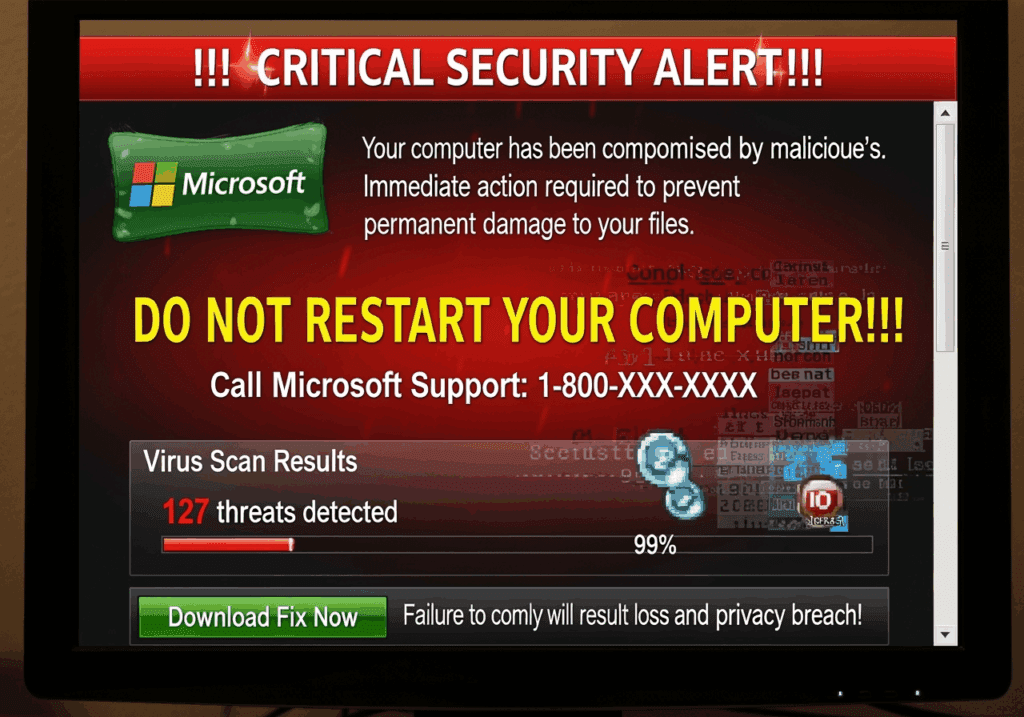
How to Tell if That Microsoft Security Alert is Real or Fake
URGENT: What to Do in the First 10 Minutes After a Computer Scam